

LET'S STAY IN TOUCH
Join the Newsletter*

Comprehensive Guide to PTZ Security Cameras
4G ptz camera_5G ptz camera_pan tilt zoom camera_ptz video camera_ptz cctv camera
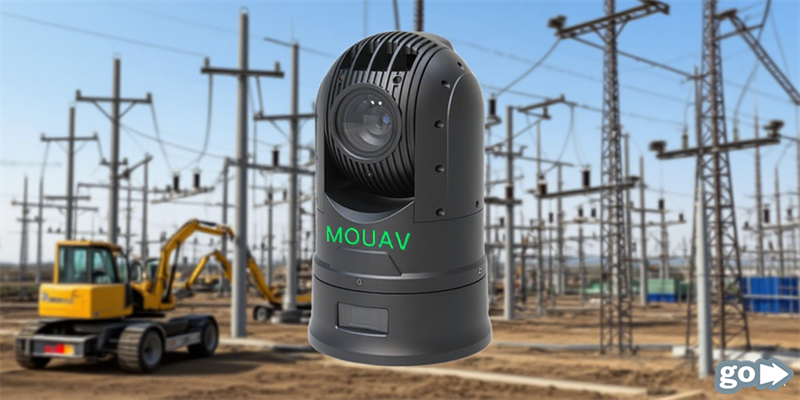
Comprehensive Guide to PTZ Security Cameras## Introduction to PTZ Security Cameras
PTZ security cameras, which stand for Pan-Tilt-Zoom security cameras, are a crucial component in modern security systems. These cameras offer a high level of flexibility and control, allowing users to monitor large areas with precision. Unlike fixed - position cameras, PTZ cameras can pan horizontally, tilt vertically, and zoom in and out on specific areas of interest.
The ability to pan allows the camera to cover a wide horizontal field of view. For example, in a large warehouse, a single PTZ camera can be used to monitor different aisles by simply panning across them. Tilt functionality enables the camera to look up or down, which is useful for monitoring multi - level spaces such as atriums or multi - story buildings. Zooming is another important feature, as it allows security personnel to get a closer look at details, such as reading license plates or identifying faces from a distance.
Technical Specifications of PTZ Security Cameras
Resolution
The resolution of a PTZ security camera is a key factor in determining the quality of the captured images and videos. High - resolution cameras can provide clear and detailed footage, which is essential for accurate identification and evidence collection. Most modern PTZ cameras offer resolutions ranging from 1080p (Full HD) to 8K. For instance, a 4K PTZ camera can capture fine details even in large outdoor areas, making it suitable for applications like perimeter security of industrial facilities.
Zoom Range
PTZ cameras come with different zoom ranges. Optical zoom is preferred over digital zoom as it provides true magnification without sacrificing image quality. Some PTZ cameras offer optical zoom ratios of up to 30x or more. This means that an object that is far away can be brought into clear view, similar to using a high - powered telescope. For example, in a large airport parking lot, a PTZ camera with a high - zoom range can zoom in on a specific vehicle to check for any suspicious activity.
Pan and Tilt Angles
The pan and tilt angles of a PTZ camera determine the extent of the area it can cover. Cameras typically offer a wide pan angle, often up to 360 degrees, allowing for continuous horizontal rotation. Tilt angles usually range from - 30 degrees to 90 degrees, enabling the camera to look downwards and upwards. This wide range of motion makes PTZ cameras highly effective in monitoring large open spaces, such as sports stadiums or large shopping malls.
Installation of PTZ Security Cameras
Location Selection
Choosing the right location for installing a PTZ security camera is crucial. The camera should be placed in a position that provides an unobstructed view of the area to be monitored. For outdoor installations, factors such as weather conditions, lighting, and potential obstructions like trees or buildings need to be considered. In indoor settings, the camera should be mounted at a height that allows for a good overview of the space without being easily tampered with. For example, in a retail store, the camera can be installed near the ceiling in a corner to cover the entire sales floor.
Mounting
PTZ cameras can be mounted in different ways, including wall - mounting, ceiling - mounting, or pole - mounting. Wall - mounting is suitable for indoor spaces where there are vertical surfaces available. Ceiling - mounting is often used in large open areas to provide a bird's - eye view. Pole - mounting is common for outdoor applications, such as monitoring parking lots or public parks. The mounting hardware should be strong and secure to ensure the camera remains stable and in the correct position.
Wiring and Connectivity
Proper wiring and connectivity are essential for the functioning of a PTZ security camera. The camera needs to be connected to a power source and a network for data transmission. Ethernet cables are commonly used for network connectivity, providing a stable and high - speed connection. Power over Ethernet (PoE) technology is also widely used, which allows both power and data to be transmitted over a single Ethernet cable. This simplifies the installation process and reduces the number of cables required.
Applications of PTZ Security Cameras
Commercial Buildings
In commercial buildings, PTZ security cameras are used for a variety of purposes. They can monitor entrances and exits to ensure only authorized personnel enter the building. In office spaces, they can be used to monitor common areas such as lobbies and hallways. For example, in a large corporate office, PTZ cameras can be used to detect any unauthorized access during non - working hours and can be remotely controlled to check different areas of the building.
Industrial Facilities
Industrial facilities require high - level security due to the presence of valuable equipment and sensitive information. PTZ cameras can be used to monitor production areas, storage yards, and access points. They can detect any abnormal activities, such as unauthorized entry or equipment malfunctions. For instance, in a chemical plant, PTZ cameras can be installed to monitor the storage of hazardous chemicals and ensure that safety protocols are being followed.
Public Spaces
Public spaces like parks, streets, and transportation hubs also benefit from PTZ security cameras. They can help in maintaining public safety by monitoring crowds, detecting criminal activities, and providing real - time information to law enforcement agencies. In a busy train station, PTZ cameras can be used to monitor platforms, ticket counters, and waiting areas to ensure the safety of passengers.
Software and Control of PTZ Security Cameras
Camera Control Software
Most PTZ security cameras come with dedicated control software. This software allows users to control the pan, tilt, and zoom functions of the camera. It also provides features such as preset positions, where the camera can be programmed to automatically move to specific locations at set intervals. Additionally, the software can be used to adjust camera settings such as brightness, contrast, and focus.
Remote Access
Remote access is a valuable feature of PTZ security cameras. Users can access the camera's feed and control its functions from anywhere using a computer, smartphone, or tablet. This is especially useful for security personnel who need to monitor multiple locations or for business owners who want to keep an eye on their properties while away. For example, a store owner can remotely access the PTZ camera in their store to check on the sales floor during a vacation.
Integration with Other Systems
PTZ security cameras can be integrated with other security systems, such as alarm systems and access control systems. When an alarm is triggered, the camera can automatically pan, tilt, and zoom to the area of concern, providing real - time visual confirmation. Integration with access control systems can also allow the camera to focus on individuals entering or exiting a restricted area.
Maintenance and Troubleshooting of PTZ Security Cameras
Regular Maintenance
Regular maintenance is essential to ensure the long - term performance of PTZ security cameras. This includes cleaning the camera lens to prevent dirt and debris from affecting the image quality. The mechanical components of the camera, such as the pan and tilt motors, also need to be checked regularly for any signs of wear and tear. Additionally, the camera's firmware should be updated periodically to ensure it has the latest features and security patches.
Troubleshooting Common Issues
There are several common issues that may occur with PTZ security cameras. For example, the camera may experience problems with its pan and tilt functions, such as not moving smoothly or getting stuck. This could be due to mechanical issues or problems with the motor control. Image quality issues, such as blurry or distorted images, may be caused by incorrect focus settings or a dirty lens. Network connectivity problems can also prevent the camera from transmitting data properly. In such cases, checking the network cables, router settings, and camera configuration can often resolve the issue.
In conclusion, PTZ security cameras are a powerful and versatile tool in modern security systems. Their ability to pan, tilt, and zoom provides a high level of flexibility and control, making them suitable for a wide range of applications. By understanding their technical specifications, installation requirements, applications, software control, and maintenance needs, users can make the most of these cameras to enhance security and safety in various environments.



One stop audio and video fusion solution provider


Message
Company
Name*
E-mail*
WhatsApp
WeChat
Verification code